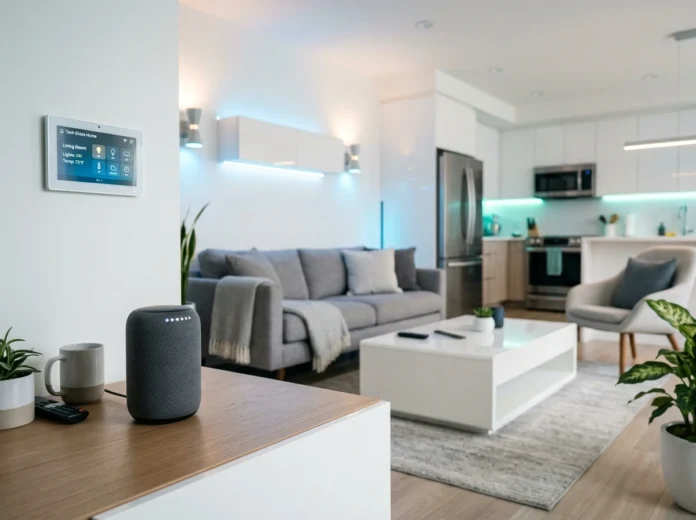
Building a smart home doesn’t have to feel overwhelming. The secret is to skip the “buy everything at once” mistake and instead work through your house one room at a time. That way, each space gets the right devices for how you actually live in it.
This smart home setup guide walks you through the whole house, room by room. You’ll learn which devices matter most in each space, how to automate them, and where to focus your budget for the biggest payoff. By the end, you’ll have a clear plan you can start using this weekend.
Quick takeaways before we dive in:
- Start with a smart speaker or hub as your control center.
- Prioritize lighting and thermostats for the fastest energy savings.
- Match each device to the room’s real purpose, not the marketing hype.
Before You Start: Pick a Hub and a Voice Assistant
Every strong smart home runs on a shared foundation. Before buying gadgets, decide on your ecosystem: Amazon Alexa, Google Home, or Apple HomeKit. Most devices work with all three, but sticking to one makes automation far smoother.
Look for products that support Matter, the newer standard that helps devices from different brands talk to each other. If you want deeper reviews and comparisons as you shop, tech ehla is a helpful resource for narrowing down your options.
Mini takeaway: Choose your assistant first. Everything else builds on top of it.
Living Room: The Command Center
The living room is where families gather, so it’s the natural home base for your smart setup.
Smart Speakers and Displays
A smart display like the Amazon Echo Show or Google Nest Hub does double duty. You get voice control for your whole home plus a screen for video calls, recipes, and doorbell feeds. Place it on a central table or shelf where the mic can hear you clearly.
Smart Lighting
Swap your main lamps for smart bulbs or add smart switches. Create scenes like “Movie Night” that dim the lights to 20% with one command. This is one of the easiest wins in any smart home setup guide because it delivers an instant “wow” moment.
Entertainment Automation
A streaming stick paired with a smart remote lets you say, “Play the game,” and watch everything power on together. Add a smart plug behind your TV console to cut phantom power draw when devices sit idle.
Mini takeaway: Focus on lighting scenes and voice control here for maximum daily impact.
Bedroom: Comfort and Routine
Your bedroom should help you wind down at night and wake up gently.
Smart Lighting for Sleep
Use bulbs that shift to warm tones in the evening. Set a “Good Night” routine that turns off every light in the house, locks the doors, and lowers the thermostat with a single phrase.
Smart Alarms and Displays
A bedside smart display can act as a sunrise alarm, slowly brightening to wake you naturally. Pair it with soft morning music and a quick weather brief so you start the day informed.
Motion-Activated Night Lights
Small motion sensors under the bed or in the hallway trigger dim floor lighting when you get up at night. No bright overhead lights, no fumbling for switches.
Mini takeaway: Automate your morning and night routines so the room works around your schedule.
Kitchen: Convenience Meets Efficiency
The kitchen is busy, hands-full, and perfect for voice control.
Smart Speakers and Timers
A splash-resistant smart speaker lets you set multiple timers, convert measurements, and read recipes aloud while you cook. This is one of the most practical upgrades you can make.
Smart Appliances
Modern refrigerators, ovens, and coffee makers connect to your phone. Preheat the oven on your commute home or brew coffee from bed. Look for Energy Star–rated models that cut both your utility bills and your carbon footprint.
Smart Plugs for Older Gear
Not ready to replace your appliances? Smart plugs turn a regular coffee maker or slow cooker into a scheduled device. It’s a low-cost way to modernize what you already own.
Mini takeaway: Voice timers and smart plugs give you kitchen convenience without a big remodel.
Bathroom: Small Space, Smart Touches
The bathroom rarely tops setup lists, but a few devices make a real difference.
Smart Lighting and Mirrors
Motion-activated lighting means no cold switch-flipping on early mornings. Smart mirrors with built-in displays show the time, weather, and your calendar while you get ready.
Humidity and Leak Sensors
A humidity sensor can turn on the exhaust fan automatically after a hot shower, protecting your walls from mold. Place a small water-leak sensor near the sink or toilet to catch problems before they flood the floor.
Mini takeaway: Leak and humidity sensors quietly protect your home and prevent costly repairs.
Home Office: Productivity and Focus
With remote work now common across the U.S., a smart home office pays off every workday.
Lighting for Video Calls
Adjustable smart lights help you look sharp on camera. Create a “Work Mode” scene with bright, cool light and a “Focus” scene that blocks distractions.
Smart Plugs and Power Management
Group your monitor, desk lamp, and charger on one smart plug. Schedule them to shut off at 6 p.m. so you actually log off and save energy at the same time.
Voice Reminders and Scheduling
Ask your assistant to add meetings, set focus timers, or start background music. Small automations add up to a smoother workday.
Mini takeaway: Use lighting scenes and scheduled power-off routines to protect focus and cut waste.
Whole-Home Security and Climate Control
Some systems work best across the entire house rather than one room.
Smart Security Cameras and Doorbells
A video doorbell lets you see and speak to visitors from anywhere. Add outdoor cameras at entry points and indoor cameras for peace of mind. Choose devices with local storage options if privacy is a priority for you.
Smart Locks
Keyless entry means no more hiding spare keys. Grant temporary codes to guests, cleaners, or dog walkers, and get alerts every time a door unlocks.
Smart Thermostats
A smart thermostat learns your schedule and adjusts heating and cooling automatically. Many U.S. utility companies offer rebates for installing one, and households often trim 10% to 15% off yearly energy costs.
Energy Monitoring
A whole-home energy monitor shows which devices drain the most power. Pair it with smart plugs to shut down the biggest offenders and track your savings over time.
Mini takeaway: Security and climate devices deliver both safety and steady long-term savings.
A Simple Order to Set It All Up
If you’re not sure where to begin, follow this sequence:
- Pick your hub and voice assistant.
- Add smart lighting in your most-used room.
- Install a smart thermostat for quick energy savings.
- Set up security with a doorbell and smart lock.
- Expand room by room as your budget allows.
This step-by-step path keeps costs manageable and prevents the frustration of mismatched devices.
Conclusion: Start Small, Think Whole-Home
A smart home isn’t built in a day, and it doesn’t need to be. The best results come from choosing one ecosystem, starting with a single room, and adding devices that solve real problems in your daily life. Lighting and thermostats give you fast wins, while security and energy tools deliver lasting value.
Pick the room that frustrates you most right now and start there. A smart display in the kitchen, a thermostat in the hallway, or a video doorbell at the front door can transform how your home feels in an afternoon. Once you see the payoff, expanding to the rest of the house feels natural.
Your smart home journey begins with one device and one simple decision. Choose your first room, plug it in, and build from there.

